
KEY EVENTS
-
-
That’s a wrap! -
Introducing Majorana 2, Microsoft’s next-gen quantum chip -
Microsoft Discovery now generally available -
The next-gen in-house Microsoft AI models -
Frontier Tuning gives companies domain-specific, high-efficiency AI -
Microsoft Scout, the new always-on personal agent for work built on OpenClaw -
A new look for Microsoft Copilot -
And now … The Chainsmokers! -
The latest on MDASH -
Rayfin delivers enterprise-grade app backends -
The GitHub Copilot app for agentic development -
Microsoft Foundry updates: agents you deploy, improve and trust in production -
Windows 365 for Agents brings Cloud PCs to agent workloads -
OpenClaw on Windows now in preview -
Organizations can unlock collective intelligence with Microsoft IQ -
Microsoft Web IQ: A new standard for AI grounding -
New class of GPU-accelerated analytics to give developers a boost -
Azure HorizonDB brings PostgreSQL into the agentic app era -
Introducing Project Solara, a new platform for agents -
NVIDIA, Microsoft join forces on unified stack -
Infrastructure updates for the agentic era -
More improvements to developer-optimized Windows 11 experience -
Developer-optimized Windows 11 experience to build and ship faster -
Windows 365 extends support for developers -
Surface RTX Spark Dev Box delivers local AI compute to devs -
Updates and new capabilities for Windows AI APIs -
Welcome to Microsoft Build Live: Your guide to today’s news
-
-
That’s a wrap!
As you can see, there’s plenty to be excited about as Microsoft builds the new toolchains and software for this era of development. We had a great time sharing all the exciting developments announced today. Huge new products, major updates and more intuitive experiences are at the core of these Build announcements, all designed to help developers build, create and innovate.
Remember, you can visit the Build 2026 homepage for more info on sessions, demos and to hear additional speakers. Also, make sure to check out the Official Microsoft Blog and learn more about all the news announced during Build with the GitHub Copilot CLI. Thank you for tuning into this keynote and our live blog.
-
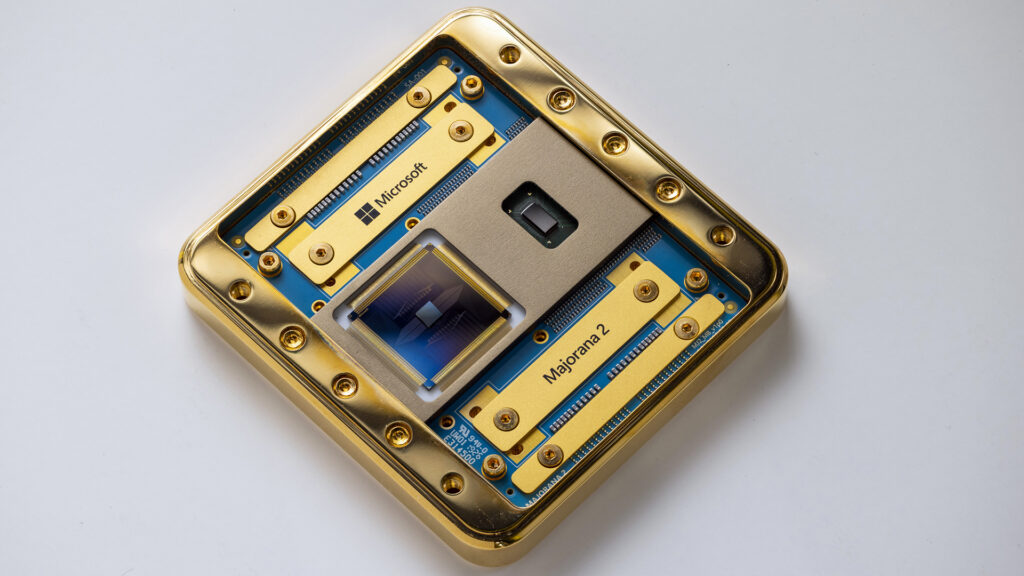
Introducing Majorana 2, Microsoft’s next-gen quantum chip
Last year, Microsoft Quantum released the Majorana 1 chip, which relied on a new state of matter that previously existed only in theory. At the time, the team said the long-term vision for quantum was to take a radical approach in addressing the fundamental barriers that have limited a scalable quantum machine: size, speed and reliability.
That’s why the release of Majorana 2 is so exciting — it’s actually a huge step towards that goal of a million qubits on a single chip that can fit in the palm of the hand. The quantum team took advantage of recent advances in agentic AI to rapidly improve its topological qubits, and as a result, they’ve overcome barriers that have limited the application of quantum computing to real-life scenarios in the past.
The qubits powering Majorana 2 are now 1,000x more reliable than the previous generation and are capable of maintaining their quantum state much longer. Other common quantum approaches measure a qubit “lifetime” in microseconds, but get this: Majorana 2 offers a mean qubit lifetime of 20 seconds, with instances lasting as long as one minute!
This combination of reliability, fast speed and small qubit size sets the stage for the quantum team to achieve a scalable quantum computer that is commercially relevant by 2029. The promise of this type of machine is enormous (think solving intractable problems in health care, energy, agriculture and other industries) and yeah, it still sounds a little like science fiction. But with Majorana 2 and other advancements by the quantum team, it’s getting closer and closer to reality.
– Christina
-
Microsoft Discovery now generally available
Microsoft Discovery, an agentic AI platform focused on a new era of research and development, is now generally available. At its core is the Discovery Engine, which uses specialized agents to mimic the scientific method across large amounts of knowledge to generate hypotheses and validate theories in a continuous loop. Plus, there are built-in controls for enterprise security, transparency and governance to help accelerate scientific and engineering research. This is especially useful for customers in highly demanding and regulated industries like food and energy, because they now have the ability to utilize agentic discovery for their R&D.
The goal is to accelerate the pace of scientific discovery across industries. Agentic AI can be used here to optimize experiments, manage workflows, propose new solutions or pinpoint previously unnoticed flaws in the research process. Researchers can deploy autonomous agent teams, guided by human expertise.
And it gets better! There is a new early preview of the Microsoft Discovery app, which is designed to expand access to this cutting-edge agentic AI for researchers, from students and individual scientists to academic labs and public research institutions. The app offers a local version of Microsoft Discovery’s core capabilities that can download and run from their own machines. You just need a GitHub Copilot account to get started.
– Christina
-
The next-gen in-house Microsoft AI models
This one is exciting! The Microsoft AI Superintelligence Team recently finished the newest generation of its in-house models, which now support reasoning, code generation and text-to-image and image-to-image workloads for developers.
MAI-Thinking-1 is Microsoft AI’s first reasoning model. It is a mid-sized, 35 billion active parameter model built for high efficiency and performance, but importantly, at a low-token cost (just say “no” to tokenmaxxing!). MAI-Thinking-1 was designed to be good at complex multi-step instructions, long-context reasoning and code generation. Notably, it was built from the ground up on clean data, without distillation from third-party frontier models. It’s designed to be fast, cheap, reliable and highly performant, and it is now open to select early partners.
But that isn’t the only new model! MAI-Image-2.5 is Microsoft’s first model to serve both text-to-image and image-to-image workloads. This is especially useful in developer workflows, when you want some assistance taking a concept into reality or you want to enhance some existing image work. There are other new members of the MAI family too: MAI‑Transcribe‑1.5 combines state-of-the-art accuracy and entity biasing, with streaming coming soon. MAI-Voice-2 is now available in more than 10 additional languages with new voice options. And MAI-Code-1-Flash is purpose-built for GitHub Copilot and VS Code to deliver high performance and lower cost. Image, transcription and voice models are generally available now on Microsoft Foundry and MAI Playground.
– Christina
-
Frontier Tuning gives companies domain-specific, high-efficiency AI
We’ve heard from many developers who want agents that are tuned to the work that matters most to them, built using their data, workflow and style. Frontier Tuning is designed to help you stop adapting your work to the model and allow you to train domain-specific models, which can help you further optimize reinforcement learning and increase efficiency.
Frontier Tuning is about getting more out of the models. Foundation models, while powerful, are highly generalized — they don’t know your APIs, your terminology or your internal processes. Tune models custom fit to your domain, workflows, policies and house style, which can yield higher-quality results faster and at lower cost.
Frontier Tuning runs on a single platform running inside your own tenant. It also ships with enterprise reinforcement learning (RL) environments. Your AI learns directly from real workflows — think task completions, decision reviews, validated outcomes. You own the model and the learning loop.
We are nowopening Frontier Tuning to select early partners.
– Nick
-
Microsoft Scout, the new always-on personal agent for work built on OpenClaw
Most of what we call “AI at work” today still waits for a prompt. With Autopilot agents, that work is becoming more continuous. Autopilots are always-on agents that work autonomously with their own identity, acting on your behalf. They stay active in the background, understand how work gets done across your apps and systems and take action without needing to be prompted each time.
Microsoft Scout is Microsoft’s first Autopilot agent. It is built with enterprise-grade security and powered by open-source OpenClaw technology, with Work IQ as its context engine. It lives where work already happens: Teams and Outlook for conversation, OneDrive and SharePoint for files, plus device-local actions on your machine.
Microsoft Scout’s trust layer is built in, not bolted on. Every agent operates under its own governed Entra identity, not a shared, anonymous service account, so the work it does is always attributable to a known actor your directory already understands. Admins will be able to set policy rules, and you can see what the agent is doing in the background as work progresses.
I’ve been testing an early local version of Microsoft Scout for several weeks before today. One of my favorite things: I set it up to monitor a GitHub discussion every morning, resolve the right feature owners across Microsoft 365 apps and open Teams chats to track status — without me lifting a finger. And after weeks of tokenmaxxing to get all these announcements ready, I’m going to need a break — so I asked Microsoft Scout to set my out-of-office for the week after Build. It figured out the dates, checked my calendar for conflicts and created the block. Work IQ is what makes that useful instead of noisy — it learns the people, files and patterns specific to how you work.
Microsoft Scout is available to Frontier organizations through an early experimental release, giving customers a chance to explore how Autopilots can fit into their own workflows. Access requires Frontier enrollment, Intune policy configuration and an opt-in attestation. Users with a GitHub Copilot account/license can then download and install the experience.
– Nick
-
A new look for Microsoft Copilot
Next up, Satya is discussing the new design for Copilot that was recently announced. Check this out for more details.
-
And now … The Chainsmokers!
Here are the special guests for today’s event, the Grammy-winning duo The Chainsmokers. If you’re here at Build, catch them live at a special concert at 6 p.m. PT here at the Fort Mason Center in San Francisco.
-
The latest on MDASH
Right now, Satya is talking about MDASH, the new multi-model agentic security system that was announced last week. Learn more about it here.
-
Rayfin delivers enterprise-grade app backends
Coding agents can generate an app in seconds. Getting it to production is still the slow part — wiring up the backend plumbing before a single user touches it. Rayfin, now in preview, collapses that work.
Rayfin is an open-source SDK and CLI. You describe the app you want — in code or in natural language to a coding agent — and Rayfin will generate a typed, governed backend: database, auth, storage and access policies. One CLI command ships it to Microsoft Fabric, where it runs as a managed service and inherits the security, governance and compliance controls your tenant already enforces. App data lands in OneLake by default — no copy, no ETL.
We’ve partnered with Replit, a leading AI coding agent platform where devs turn natural language into running apps. Build in Replit, deploy with Rayfin and the app, data and services stay in your own Fabric tenant — under the identity, network and governance controls you already trust.
– Nick
-
The GitHub Copilot app for agentic development
Agents let us write code faster than ever before, but that’s only one part of building software. The GitHub Copilot app—which is now available in preview — is a native desktop app that brings the best of agentic development to the place you’re already spending a ton of your time: GitHub.
I’ve been using this app for a while and I love it, because instead of just starting with a blank prompt or a bunch of disconnected tools, you can start from existing GitHub Issues, Pull Requests and even other sessions. And those details and context stay with you and stay connected to your session.
Under the hood, the GitHub Copilot app uses git worktrees, so each session has its own space with its own branches, files, conversations and task state. This way, the work you’re doing stays separated, even when you’re working on multiple things at a time. And you can pause and resume sessions, so you can come back to where you left off.
The app also makes it easy to orchestrate multiple agent sessions in parallel and keeps changes moving through validation, review, CI and merge. Copilot handles the execution. Developers stay in control. It’s the agent-native way to use GitHub.
– Christina
-
Microsoft Foundry updates: agents you deploy, improve and trust in production
The hard part of building agents isn’t the prototype — it’s everything after. Isolation. Identity. Tools that actually work. A path from production back to a better version. Microsoft Foundry’s latest releases round out the four layers production agents have been missing.
Hosted Agents in Foundry Agent Service will be generally available in coming weeks, providing per-session sandboxing for untrusted code, sub-100 ms cold starts and zero idle cost in a framework-agnostic runtime.
Build. Microsoft Agent Framework (MAF) v1.0 (generally available) ships an agent harness as a first-class concept — skills, context, memory and middleware are production-ready. Drop a GitHub Copilot SDK or Claude Agent SDK agent into a MAF workflow as a named participant; the orchestrator stays deterministic. New toolboxes in Foundry (preview) will unify access to capabilities like web and file search, MCP, OpenAPI spec and A2A protocol. Fireworks AI on Foundry (generally available) offers fast access to open-source models through a single Azure endpoint with Managed Compute (private preview) adding dedicated GPU capacity.
Ground. Foundry IQ (generally available) knowledge bases unify Work IQ, Fabric IQ, File Search, Azure SQL and MCP behind one SLA-backed retrieval endpoint. Microsoft World Grounding extends that reach to live external information alongside internal data. Procedural memory (preview) will let agents learn the “how” across multiple runs, not just the “what.”
Operate. Tracing and evaluation for hosted agents are generally available — one OpenTelemetry pipeline, evals linked back to the trace that produced them. Agent optimizer (preview coming soon) in Foundry Agent Service will turn those signals into ranked candidate improvements across prompt, tools, skills and context, with diffs, audit and one-click rollback. Adaptive Evaluations (preview) will convert policies into automated tests for agent behavior — usable standalone or built into Foundry. Agent Control Specification (preview) will let teams define and enforce what agents can do in production, across Foundry, Microsoft Agent Framework and LangChain.
Reach. One-click publishing to Microsoft Teams and Microsoft 365 Copilot will be generally available next month. Identity and tenant policy will flow through automatically.
– Nick
-
Windows 365 for Agents brings Cloud PCs to agent workloads
Every dev these days is using agents and every engineering manager wants their devs to use MORE agents. That makes it critical for organizations to have a way to create secure, scalable agent execution environments. This is where Windows 365 for Agents comes into play. Agent makers can use it as part of Agent 365 tools, now generally available, or through a preview available in Microsoft Copilot Studio. It enables enterprise automation by giving AI agents secured and managed Cloud PCs that operate inside the environments where business happens.
This way, agents can interact directly within applications and browsers, execute multi-step workflows and use the same systems that enterprises rely on every day, whether modern, legacy, API-based or UI-driven. And because every Cloud PC is Entra ID-joined, Intune-managed and policy-enforced, it gives IT a consistent way to scale agents without compromising compliance or security.
And agents of all stripes are supported by Windows 365 for Agents, whether it’s no-code or pro-code! Microsoft is built on Microsoft tech (dogfooding FTW), so Windows 365 for Agents is already powering experiences including computer-use scenarios in Researcher and Project Opal. And this is enterprise-ready, with a consumption-based pricing model so organizations can pay as they go.
– Christina
-
OpenClaw on Windows now in preview
Like a lot of devs, I spend a lot of my time every day interacting with agents, either locally or in the cloud. But running agents locally can introduce security issues, which can require some extra setup on my part in order to keep my IT admins happy (everyone is a member of the security team!).
That’s why it’s so cool that Windows now has new capabilities for running agent workloads directly on the device, with built‑in identity, isolation and governance enforced by the operating system. Now available in preview, Microsoft Execution Containers (MXC) is a new policy layer that will allow developers and IT administrators to describe agent containment requirements once and rely on Windows to enforce them using native operating system primitives. So you can run your code more safely without a lot of complicated setup.
This includes support for agent runtimes such as OpenClaw on Windows, now the Alpha available in GitHub. OpenClaw is one of the most popular GitHub projects of all time, and now it works with Windows even more seamlessly. Agents can execute multi‑step workflows locally while running inside OS‑enforced boundaries rather than unmanaged user sessions. If used correctly, this can help when agents execute code, access files or interact with networks on the device.
Plus, NVIDIA is collaborating with Microsoft to bring the NVIDIA OpenShell runtime to Windows, built on MXC. OpenShell is Nvidia’s open-source runtime for executing autonomous AI agents in sandboxed environments. By integrating MXC via OpenShell, developers have an easy, packaged way to deploy autonomous, always-on agents safely, while also supporting enterprise-friendly features such as Policy Creation and Management, Inference Routing and personally identifiable information (PII) obfuscation.
In combination, this helps give devs run agents using open runtimes while also giving IT consistent visibility and control across devices, virtual machines and cloud environments.
– Christina
-
Organizations can unlock collective intelligence with Microsoft IQ
Every organization already has an intelligence layer — spread across conversations, documents, apps, workflows and operational systems.
Today at Microsoft Build, we’re introducing Microsoft IQ: a shared intelligence foundation for the agent era.
Now generally available, Microsoft IQ brings Work IQ, Fabric IQ and Foundry IQ together, making it accessible across GitHub Copilot, Microsoft Foundry and Copilot Studio. Developers can build once and reuse trusted organizational context everywhere their agents run.
Work IQ, generally available this month, is a workplace intelligence layer that delivers a semantic understanding of everything happening across your business. Foundry IQ, generally available now, helps agents reason across enterprise knowledge and the web via Web IQ. Fabric IQ ontology, available in preview, provides shared business semantics, helping agents understand the relationships between people, data, workflows and operations.
The result is agents that are easier to build, faster to production and more capable from day 1 — with consistent governance, permissions and grounding built in.
As agents become the new application model, context becomes critical infrastructure.
Microsoft IQ creates a continuous flywheel with every prompt, workflow and decision contributing new organizational context — helping agents improve how they reason, plan and perform over time.
– Nick
-
Microsoft Web IQ: A new standard for AI grounding
AI applications and agents need more than a bigger prompt. They need fresh, attributable evidence from the world as it exists now. This includes data created after the model was trained as well as information too dynamic, specialized or long-tailed to be confidently represented in the model weights.
We are introducing Web IQ, a set of AI-native grounding APIs that connect AI systems and agents to fresh information from across the web. Beyond retrieval, Web IQ discovers, ranks, extracts and packages relevant information from web pages, news, images and video, enabling agents to ground decisions and responses in timely, high-quality external knowledge.
Web IQ sets a new performance standard for grounding APIs: highest answer quality, lowest latency and fewest tokens. The APIs in Web IQ already power grounding experiences for Microsoft Copilot and ChatGPT. Beginning today, it’s available in limited access to select Azure customers.
Web IQ joins Microsoft’s growing IQ platform, extending intelligent access across enterprise, business and web knowledge. Together, these capabilities help developers build agents that reason over the right information at the right time — whether that information lives in an organization’s systems, its data estate or the open web.
– Nick
-
New class of GPU-accelerated analytics to give developers a boost
Fabric Data Warehouse now runs eligible queries directly on NVIDIA accelerated computing inside the execution engine. There’s nothing to rewrite, no infrastructure setup, no cluster to size — you enable hardware acceleration in workspace settings and the query optimizer pushes work down to the GPU when that’s the better plan.
The research behind this? CoddSpeed was named the Best Industry Paper at SIGMOD 2026, and Fabric is the first fully managed SaaS data warehouse to ship it. In internal benchmarking in May 2026, GPU‑accelerated Fabric Data Warehouse ran up to 7x faster than three other major cloud warehouses across common reporting, application and AI-driven analytics scenarios. Early customer signal: UNC Health is seeing up to a 5x improvement in query speeds on their existing workloads.
Build interactive reporting, agent tool calls and app backends against the same warehouse, without standing up a separate accelerated store or rewriting SQL to keep things responsive under load. Query acceleration enters early access preview in the coming weeks.
– Nick
-
Azure HorizonDB brings PostgreSQL into the agentic app era
Developers are building an entirely new class of applications — apps that retrieve context, reason over data and take action for users. And for many devs, the natural place to start is a database they already know and trust: PostgreSQL.
But building agentic apps shouldn’t mean choosing between the PostgreSQL experience developers already like, the AI capabilities these apps need and the reliability, security and operational depth required for most mission-critical systems.
Enter Azure HorizonDB: a fully managed PostgreSQL service on Azure, designed for high availability and performance to meet the demanding requirements of agentic applications. It is now available in preview.
HorizonDB brings ultra-low latency and rapid read scale-out with up to 3x faster transactions and search performance when compared to self-managed PostgreSQL.
New today are built-in AI features including advanced vector indexing, semantic search, in-database access to AI models and Azure integration with Microsoft Fabric and Microsoft Foundry, plus development accelerated by GitHub Copilot in Visual Studio Code.
With Azure HorizonDB, developers can keep building with PostgreSQL while getting the scale, performance and reliability needed for the next generation of intelligent apps.
– Nick
-
Introducing Project Solara, a new platform for agents
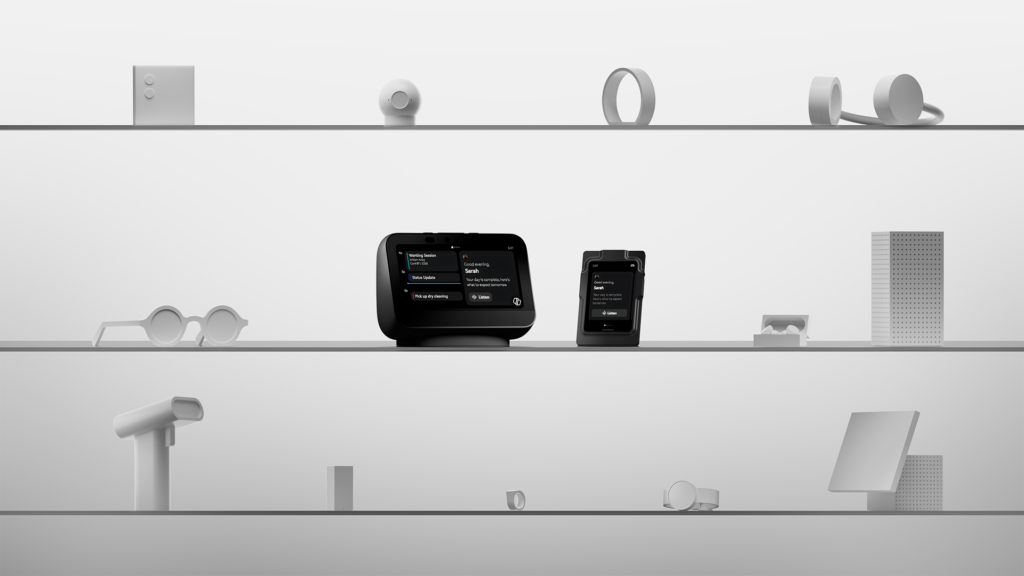
We are rapidly approaching an agent-first world, where agents are at their best and most useful when they are easy to reach, naturally engaged and always available. But this new agent-first world needs a new kind of platform. That’s why Microsoft is showing an early look at Project Solara, a chip-to-cloud platform designed for an open, multiple agent world that expands how agents are built, deployed and experienced across every layer of the stack.
Project Solara was conceived as a way to provide a low-cost, turnkey way to bootstrap agent hardware that can be tailored to a specific customer, institution or use case. Microsoft is showing off two concept reference designs to give you an idea of what can be envisioned with Project Solara.
- Project Solara badge device concept is a reference design for agent-first interaction on the go. Made possible thanks to next-generation wearable silicon from Qualcomm, this brings agents into the moments when users are away from the desk, moving between meetings, traveling or working hands-free. No more keeping a laptop open while walking between meetings!
- Project Solara desk device concept is a desk companion reference design built for an agent-first experience. Powered by a MediaTek IoT SoC, this dedicated, ambient device for work is always available, always grounded in context and designed to help think, plan and get things done without breaking flow.
Right now, agents are confined to a specific app, screen or device. These two concepts show what’s possible when agents can live more places, more fluidly.
– Christina
- Project Solara badge device concept is a reference design for agent-first interaction on the go. Made possible thanks to next-generation wearable silicon from Qualcomm, this brings agents into the moments when users are away from the desk, moving between meetings, traveling or working hands-free. No more keeping a laptop open while walking between meetings!
-

NVIDIA, Microsoft join forces on unified stack
Satya and NVIDIA founder and CEO Jensen Huang are now discussing the companies’ latest collaboration – bringing agentic AI to every developer through a unified, accelerated computing stack that features new Windows PCs powered by NVIDIA RTX Spark and NVIDIA DGX Station for Windows.
Through this full-stack partnership, NVIDIA and Microsoft partnered to meet the growing demands for agentic AI with a software ecosystem layer on edge devices for deploying personal to frontier agents.
-
Infrastructure updates for the agentic era
Maia 200, our second-gen AI accelerator, is already running in production in Iowa and Arizona — with Italy, Australia and South Korea next. It delivers the best tokens per dollar per watt in Microsoft’s fleet, adding inference capacity that customers can put to work. New virtual machines based on Cobalt 200 are now in preview, and the Cobalt 200 processor is now deployed in more than 10 global regions with more to come.
And with Multipath Reliable Connection (MRC) — an open network protocol co-developed with AMD, Broadcom, Intel, OpenAI and NVIDIA, intelligence is shifted to the endpoints, so workloads can dynamically route around issues and maintain performance without costly stalls or restarts. This approach drives higher utilization and more predictable performance and is resilient to the variability that comes with operating extreme-scale infrastructure. Alongside the spec, we’re publishing tooling including libMRC, NCCL integrations and a verbs shim library, so existing RDMA applications can run on MRC without source changes.
– Nick
-
More improvements to developer-optimized Windows 11 experience
Forgive me for getting nerdy for a second, but this announcement is lowkey one of my favorites from the entire show. Microsoft is bringing familiar Linux-like command-line utilities to Windows with Coreutils. If you’re a developer who spends a lot of time with Linux, macOS or inside WSL2, these are the everyday command-line tools you already know, script against and rely on, but now built, shipped and maintained by Windows.
This is awesome for anyone (like me) who frequently moves across Linux, macOS, WSL, containers, cloud or local Windows development because it will reduce the friction across those different tools (do I have this utility installed on this device or in this surface), and as a result, those scripts and muscle memory you’ve built up over the years can remain, even when you’re in a Windows dev environment.
For almost a decade, WSL — or the Windows Subsystem for Linux — has been one of the best things to happen to Windows development. And now, Microsoft is introducing WSL containers, which is a built-in way to create, run and interact with Linux containers using a familiar CLI and API. This means that Linux containers will now run directly on Windows out of the box. The new wslc.exe CLI will let developers directly control and build and run containers, while the WSL containers’ API will let native Windows apps run Linux containers for local AI workloads, testing pipelines and Linux-based processing.
For devs, especially if you’re on a powerful machine, that will mean less switching, fewer VMs and staying inside the applications you’re already comfortable with.
And although this is great for individual developers, enterprises will also be able to benefit from WSL containers, through policy-based enablement, image source controls and IT admin visibility. Both updates will be coming soon to preview.
– Christina
-
Developer-optimized Windows 11 experience to build and ship faster
Ask any dev what one of the most time-consuming tasks is, and they’ll probably say, “setting up a new dev machine.” I recently had to re-image my dev machine and it took the better part of the day. This is why I’m personally so excited by the new Windows Development Configurations, which are now generally available. These configurations will let users go from a fresh machine to a ready-to-code environment in minutes, thanks to a single WinGet configuration file that sets up an optimized, distraction-free dev environment. It will be automatically configured with pre-installed tools like WSL, PowerShell 7, Git, the GitHub CLI, VS Code, Python and more.
Thanks to harnesses like the GitHub Copilot CLI, developers are spending more time in the terminal than ever before. That’s why I’m in love with Intelligent Terminal, whichis an experimental version of Windows Terminal that provides context to your favorite agents via ACP (Agent Communication Protocol) so you can stay in the terminal and query, debug or complete any task on hand. It’s now available as an experimental version.
It’s built on the same Windows Terminal codebase you know and love, and it keeps the best features (tabs, profiles, etc.) BUT it adds native-agent CLI integration. And because it understands the live shell stat (think stuff like your command history, your working directory, your exit codes and your git content), if something goes wrong or a command fails, Intelligent Terminal will recognize that context and can offer suggestions for immediate fixes.
– Christina
-
Windows 365 extends support for developers
The best developer tools are the most flexible developer tools, which is why Microsoft is committed to creating the same great experience regardless of the environment.
Windows 365, a cloud-based service that securely streams the full Windows desktop experience to any device, is expanding support for developers with the preview of a new Windows 11 developer configuration image. This provides secure, ready-to-code Cloud PCs with a pre-configured development experiences from the initial sign-in.
Any developer can tell you that the process of setting up a new machine — or even working from a different machine — can be a total time suck. This is why the Windows 11 developer image is already pre-configured with commonly used dev tools such as Visual Studio Code, Git, the GitHub CLI and WSL2 with Ubuntu. You can even extend the environment with additional SDKs, CLIs, packages and build tools based on your project requirements, while still remaining aligned with your organization’s policies and controls.
This means that devs can have seamless, cross-device access, moving between local and cloud environments, but still maintaining the same consistent Windows development experience.
– Christina
-
Surface RTX Spark Dev Box delivers local AI compute to devs
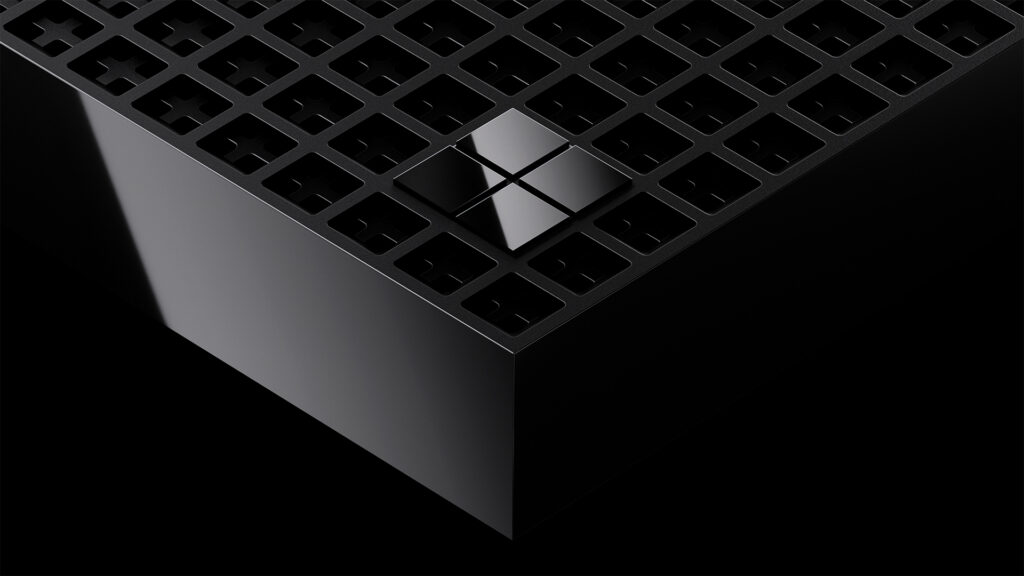
Nothing is more annoying than having to wait on your tools to do their job. And that’s where the Surface RTX Spark Dev Box comes in.
Surface RTX Spark Dev Box is a new, compact dev box that was purpose-built for AI developers and is powered bythe NVIDIA RTX Spark, the same silicon featured in Surface Laptop Ultra, with 1 petaflop of AI compute alongside 128 GB of unified memory capable of running up to 120B parameter models locally.i
Surface RTX Spark Dev Box was designed for sustained developer workloads: Think long-running training jobs, agentic AI pipelines and local model fine-tuning. And it all happens within a 100W thermal envelope out of the box. Surface RTX Spark Dev Box also ships with a custom-tuned Windows 11 Pro configuration that is fully loaded at the start. That means WSL2 with native GPU passthrough and full CUDA support, alongside your favorite pre-installed tools like Visual Studio Code and GitHub Copilot.
Surface RTX Spark Dev Box will be available later this year in the US via microsoft.com/devboxii.
– Christina
i Source: NVIDIA. Based on 1 Theoretical FP4 TOPS using the sparsity feature.
ii Microsoft Surface RTX Spark Dev Box has not yet been authorized for sale as required by the rules of the Federal Communications Commission (FCC). Microsoft Surface RTX Spark Dev Box is not, and may not be, offered for sale or lease, or sold or leased, until authorization is obtained.
-
Updates and new capabilities for Windows AI APIs
For the last few years, Windows developers have been able to take advantage of various AI features locally on Copilot+ PCs. But now, even more developers can benefit because Windows AI APIs are being extended beyond Copilot+ PCs to support even more hardware, starting with GPU support for Phi Silica and CPU support for video super resolution (VSR) and live captions. There are some new APIs too. For example, the Speech Recognition API, now in preview, delivers real-time, on-device speech-to-text from any audio source (microphone, stream or file) with hardware-accelerated execution on CPU or NPU.
But that’s not all. A new, next-generation small language model (SLM), Aion 1.0 Instruct is in preview. This model will be smaller, faster and more efficient than the current Windows OS SLM, and it was designed for on-device workloads. Aion 1.0 Instruct will power everyday text intelligence (so summarization, rewrites, intents, accessibility) and extend beyond Windows AI APIs with integration into Edge and availability as open weights.
And finally, the team has announced the new Aion 1.0 Plan, which will be available in the coming months. Aion 1.0 Plan is a 14-billion parameter reasoning and tool-calling model with 32K context length that ships in-box as part of Windows. This lets applications reason over use intent, invoke tools, manage files and orchestrate sub-agents, bringing fully agentic workflows onto your local device.
– Christina
-
Welcome to Microsoft Build Live: Your guide to today’s news
Microsoft has always been a developer tools company, and those tools constantly change and evolve over time. This year, the way we share our developer news is changing too!
First, let’s introduce ourselves. I’m Christina Warren from GitHub — aka @filmgirl — where I work on the developer relations team, helping to make GitHub the best place for all developers, especially in the age of AI, where the process of what we build and the tools we use are constantly changing and evolving. And, I’m Nick Brady — an AI charmer who loves a well-placed em dash, leading developer experience for Microsoft Foundry, focusing on docs, code samples and our community to empower every developer to build AI apps and agents.
For Build 2026, Microsoft wanted to do something a little different. You’re probably familiar with the Book of News, the long-standing guide to all the news we make at major events. Consider this the remix. Microsoft Build Live is real-time coverage — with us serving as your guides as the announcements unfold. We’ll explore what’s new, what’s been updated and why it matters for developers. Expect more on the moments that matter with the context to understand how it connects across Microsoft’s platforms and services.
Additionally, you’ll find links to technical info for those of you who want to go deeper into the architecture, capabilities and practicality of these announcements.
Consider this your companion to Build 2026, so whether you’re following live, catching up after clocking out or taking a deep dive weeks later, you can use this blog to keep you updated on all things Build. Let’s get started!
– Christina & Nick